BSC Designer
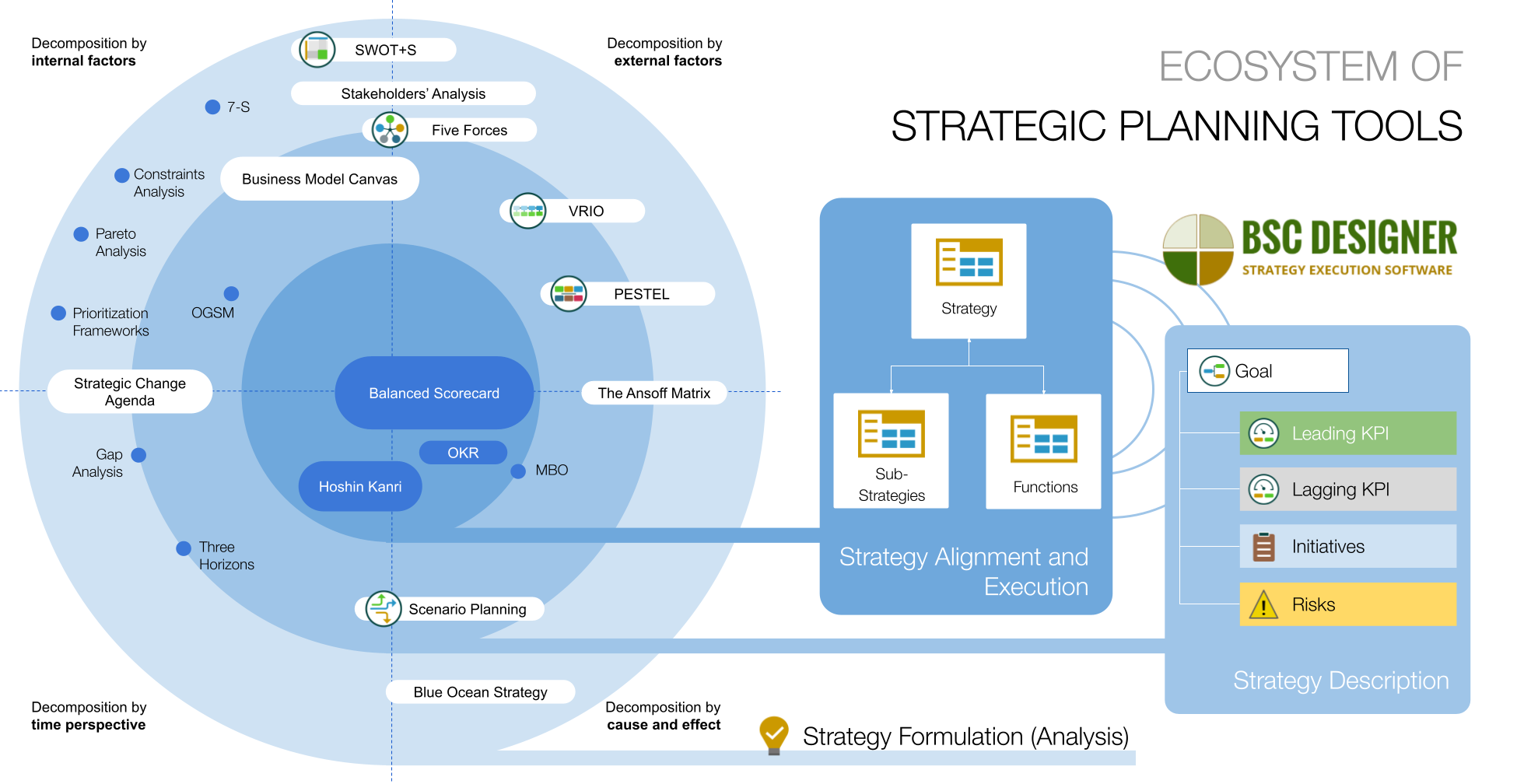
BSC Designer is an ultimate set of Balanced Scorecard (?) software and web-service solutions, that makes it easy to successfully measure, control and improve business performance.
Why use BSC Designer
The BCS Designer is one of the most powerful and easy to use Balanced Scorecard software on the market. The product is:
- User-friendly – fast to learn and easy to use
- Compatible to any business model - based on strategic goals
- Capable to drive business success – helps to put strategies into practice
Do not just believe us. Here is what our clients say:
Compared to the alternatives, BSC Designer offers a simple control, user-friendly interface, and graphically good-looking reports that may be exported to Excel or HTML. Furthermore, it’s possible with this program to organize KPIs in own categories and structures, including weight assignment, in a very simple manner.
Martin Horký, Quality Manager at Karsit Holding Ltd. More case studies…
How BSC Designer software works
With the BSC Designer software, you can manage your strategies in a professional way. Here is how simple it is:
- Add all your strategic goals in the system
- Assign KPIs and initiatives to each goal
- Create professional strategy maps
- Link strategic goals and KPIs to the strategy maps
- Update or add new content at any time
All data can be presented on a dashboard, exported to Excel and HTML, or published online.
| Stop lights display | Time chart, Time Points | Business Goals | |||
| Custom formulas | HTML report | Export to Excel | |||
| Strategy maps | Cascading scorecards | Map with KPI |
Check editions comparison chart.
How can BSC Designer help your business
- BSC Designer helps to improve business performance by applying the Balanced Scorecard concept
- BSC Designer helps you achieve strategic goals by offering you professional tools to incorporate KPI-based Management
- The Balanced Scorecard concept is used by more than 50% of Fortune companies
- CEOs and top-managers use BSC Designer to measure and improve business productivity. Check customer opinions of BSC Designer product
What our clients say:
After I’ve installed BSC Designer, I would like to say it is a very good program. Thanks again for introducing me to see the great BSC tool. I especially like this program for the Strategy Map Editor, with help of which I improve my job.
Kongkiat Buranasri, Royal Thai Air Force Academy. More case studies…
BSC Designer is available as:
- BSC Designer Standard [Download | Buy Now]
- BSC Designer PRO [Download | Buy Now]
- BSC Designer Online [Home Page | Log-in]
What is KPI-based Management
KPI-based management is an effective business concept based on measuring the performance of a company. The Key Performance Indicators (KPI) can be defined as “effectiveness/success indicators” that measure important company activities which achieve Strategic Goals.
This concept is simple to implement. First you define your company vision, where you want to be in a defined period of time and what you are going to get there. Your objectives are your Strategic Goals (i.e. increase sales by 50%) and your KPIs are your success indicators, that help you monitor and control progress.
If you need help with your KPIs, as part of the software package, we offer you free professional support through our winninkpi.com community. Here fellow business professionals, and our team of KPI professionals, will help you step by step in building your indicators.
Through KPI-based management, you will learn the strenghts and weaknesses of your Strategic Goals and business implementation, and you will be able to identify what works well and what needs changing.
What is the Balanced Scorecard concept
Balanced Scorecard is an executive corporate system used for strategic planning and management. Businesses worldwide use this concept to achieve maximum business success, by closely monitoring and controlling business performance and progress in achieving strategic goals.
It is part of the KPI based Management and it was put together by Harvard Business School professor Dr. Robert S. Kaplan, along with business consulting specialist David P. Norton in 1990.
Through the BSC Designer software, you can implement the Balanced Scorecard concept into your business in a simple and effective manner that will give results straight away.
By using the BSC Designer ultimate set of Balanced Scorecard software and web service solutions, you can:
1. Perform precise planning
At the foundation of the Balanced Scorecard concept is that the business must turn the strategic plan process into one of the key functions. Through a well-developed strategy, at the core of the business must lay a precise theory of exact measured values which make it possible to create realistic forecasts.
This exact measured values are KPIs, that are strategically focused and measured under a wide range of factors in order to give valuable and correct results. This results offer a snapshot of the business at precise points in time, but can also show progress over time.
2. Turn vision into strategy from 4 business perspectives
The Balanced Scorecard concept takes a 4-dimensional perspective to business strategy, with each of them potentially containing its own sub-perspectives and exact goals. The perspectives are the following:
- Financial perspective
- Customer perspective
- Innovation and learning perspective
- Internal process perspective
A well-implemented Balanced Scorecard concept provides linking between internal business processes and strategic goals, and a framework for ensuring that all business components are working towards achieving the core business vision.
Balanced Scorecard is aimed to link the strategic and operational activities of the company so effectively, that every employee (even at the lowest hierarchy level), can understand exactly what strategic goal he or she is helping to achieve, when working on any task.
BSC Designer Software Editions
BSC Designer is a software tool that automatically incorporates the the Balanced Scorecard concept and other KPI-based management systems into the business model. BSC Designer is extremely user-friendly and simple to learn, yet has very powerful features for monitoring business performance and success.
BSC Designer makes it possible to create projects that would support any KPI-based Management concept (including Balanced Scorecard). It automates most implementation and maintenance processes, minimizing costs and efforts.
BSC Designer is available in three desktop editions that have different pricing schedules which include BSC Designer Light (freeware with very limited functionality), BSC Designer Standard (allowing for many more functions and having a mid-level pricing) and BSC Designer Pro (a fully-functioning tool for real professionals that absolutely warrants its higher price).
We provide different editions of our tools so that they can become good solutions for almost any business activity, from small home businesses to huge corporations.
BSC Designer Online is a great solution for multiple project uses. It is perfect for users who travel a lot and for transnational and online businesses. BSC Designer makes it much easier to coordinate through the Internet. This powerful edition can be purchased though special credits, allowing customers to use it with a limitation on time and the number of projects that they can work on. You can check out the difference between functionality on the four editions of BSC Designer (both online and desktop ones) in this comparative chart.
How to use BSC Designer – Basic KPI Management Functions
Basic KPI management provides a group of functions and tools that forms the entire set of software products called BSC Designer. Those functions are available in all four editions of BSC Designer: Light, Standard, Pro and Online.
BSC Designer Tree of Metrics
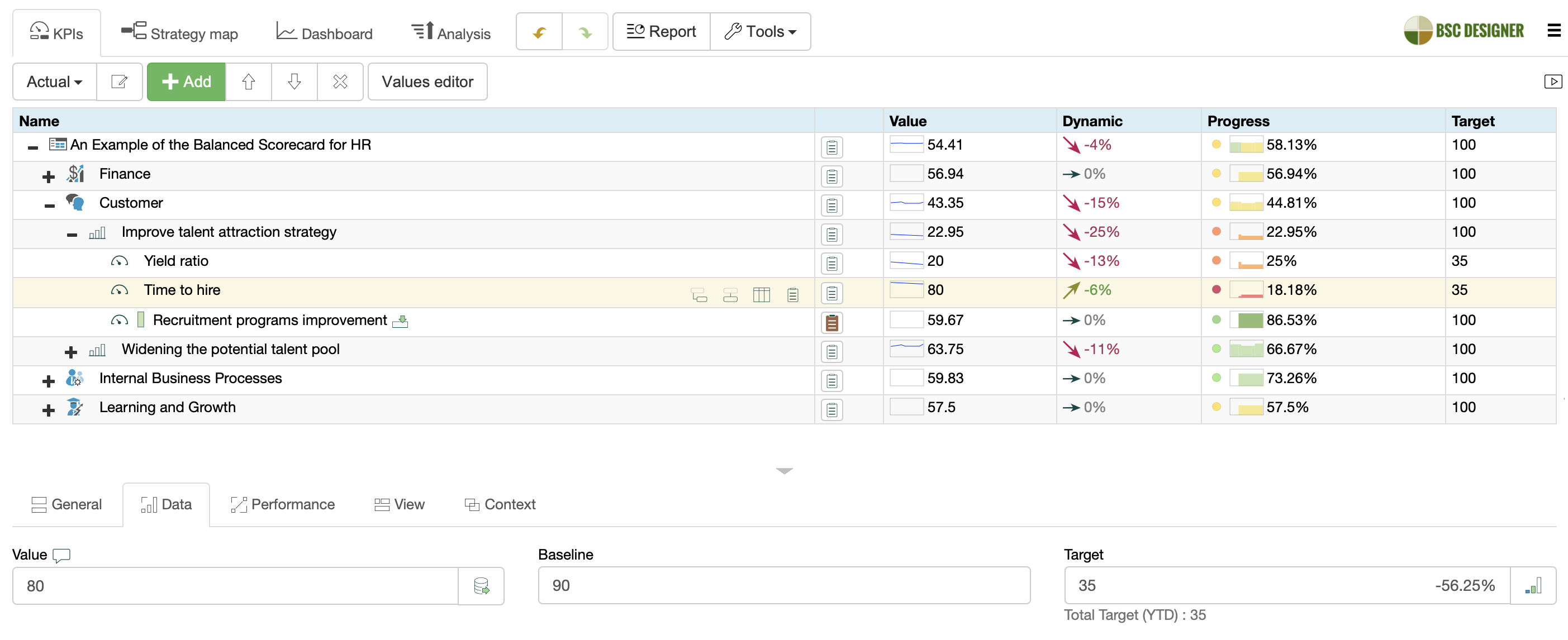
All four editions of BSC Designer provide you with an easy-to-use and understandable tree of subcategories and indicators. The tree can be presented in both simple and column view modes. You can create and edit indicators’ and categories’ names and descriptions with just a few clicks!
- Read more about the Tree of metrics.
Weights in BSC Designer
Manage the importance of categories and indicators by changing their weight values.
By default, the weights are set to “1,” but you may change the weight of every element in a range from “1” to “10”: the higher the weight value, the more important the elements are.
You may also change the Max Weight number to customize the range of weight values.
- Read more about Weights in BSC Designer.
BSC Designer Stop Lights
Look at stop lights and other signal icons to capture the indicators that require your attention more than others. Signal icons also portray the dynamics of performance changes.
- Find more information about stop lights and other signal icons.
BSC Designer Measure Units
Manage measure units of the indicators, select “Score” or “%” as the measure unit, or create your own (for example, “$ / hour”).
- Learn more about measure units.
BSC Designer Calendar and time points
Manage indicators over time, using the calendar and time points. Each of the indicators may be changed once per day. After the project is filled with values for different time points, the dynamics are shown in the Time Chart. which is available for each of the indicators and categories (including the entire project).
- Learn more about Time points management.
BSC Designer Standard and Pro Edition Functions
“Standard” functions are a group of functions available in BSC Designer Standard and Pro editions. It includes several different types of reports, diagrams and charts, as well as other useful features.
The information from the BSC Designer can be exported via multiple channels, which makes it easy and cost effective to share information and use it for strategic planning.
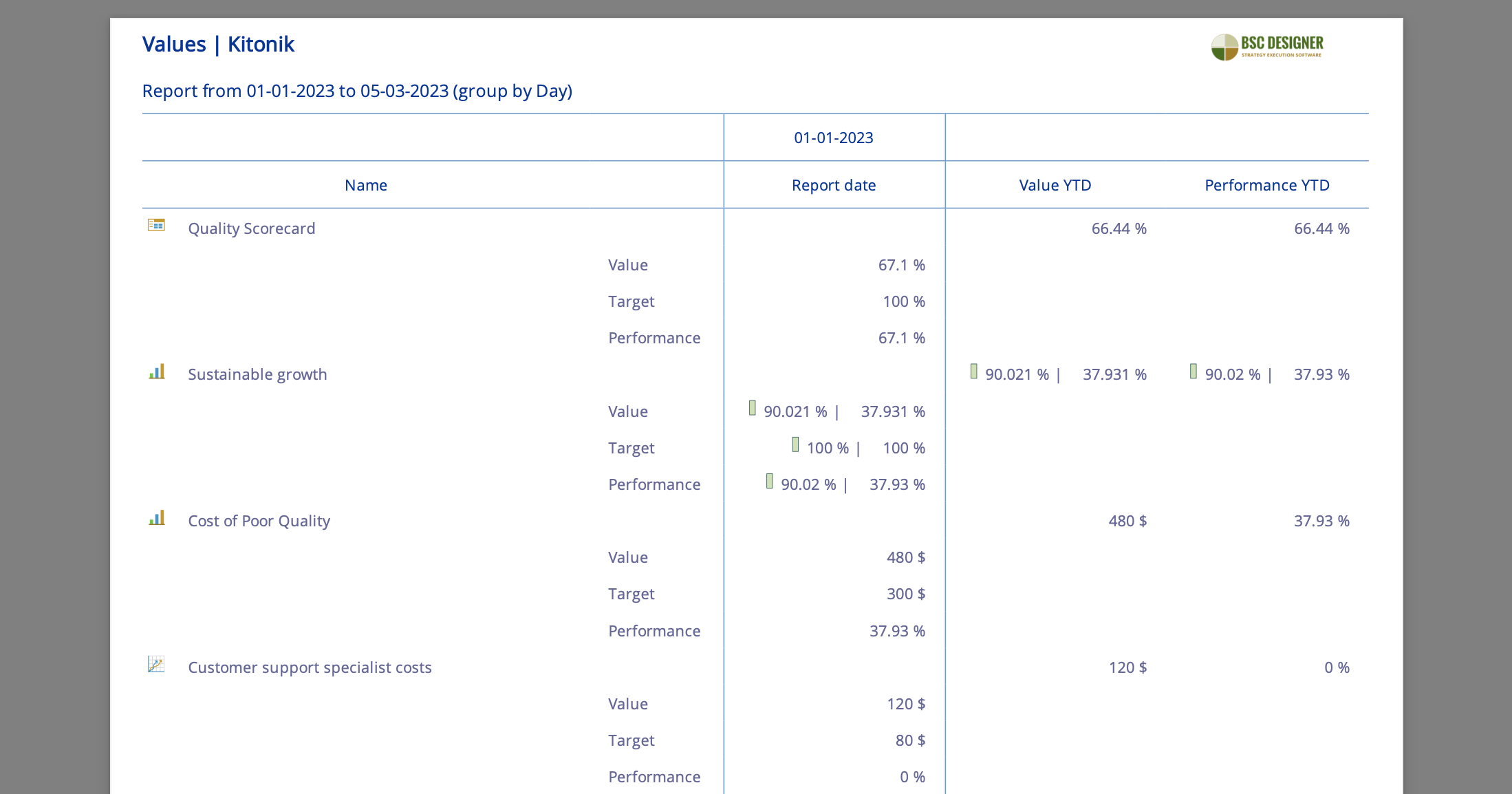
BSC Designer HTML Report
The HTML report is the most useful and detailed report, showing the performance dynamics and in depth details about the elements of the tree.
You can generate the HTML report with a few clicks. Afterwards, you can then print it, share it via email, upload it to the remote server so you can share it worldwide or just collect it.
The BSC Designer HTML report is also available in BSC Designer Online.
- Check out the full example of report.
- Find the full description of HTML Report.
BSC Designer Excel Report
BSC Deisgner makes it easy to share information about the measurement reports by simply exporting it to MS Excel. This way you have a BSC Designer Excel Report will all the project information included, that you can share you with colleagues, team members or the entire organisation. This makes it very easy to keep a transparent and well-communicated strategic performance management system withing the business.
This data can be shared via Excel with anyone that does not have BSC Designer (i.e. outsources).
By using the Excel project, you can manage the basic aspects of indicators and categories, such as weights and values. In other words, MS Excel Report can be used as an alternative to BSC Designer for those that are not equipped with the tool, however, it does not provide the same functionality as BSC Designer.
- Learn more about MS Excel report
Our clients enjoy the facilities that BSC Designer offers to easily share information with other users:
We evaluated and tested the BSC Designer, and our first impression is that this simple program could help us in our future work and communication between Balanced Scorecard participants.
Srdjan Sokolovic, BSC specialist at NIS – Petroleum Industry of Serbia. More case studies…
BSC Designer PowerPoint Report
BSC Designer makes it possible for the data to be exported to a MS PowerPoint or PowerPoint Report. This is a perfect function for making presentations.
With just a few clicks, you will be provided with a *.ppt file that contains slides that show the basic information about the project, the project’s overview (a chart that shows names and descriptions of the project’s elements) and a full review of every element in the project’s tree (including Time chart and Gauge diagram).
This function could be really helpful to make clear, informative presentations of the project performance to Top Management, as well as to Shareholders and Investors.
- Read more about MS PowerPoint Report.
BSC Designer Optimization Graph
The optimization graph visualizes the optimization direction of KPIs, showing growth, decrease or plateau. The graph also reveals the current value with its percentage for the indicator.
The optimization graph does not work with tree elements such as categories and the project; only the KPIs data is represented in the BSC Designer Optimization Graph.
This graph can be very helpful to see what function is being used to measure the metric’s data.
In a Standard edition, it could be linear minimizing or maximizing functions, but in the Pro edition you will be able to create your own functions that will also be presented on this type of graph.
- Read more about Optimization graph.
BSC Designer Diamond Diagram
The diamond diagram is based on the radar chart method. It can be helpful to see which part of the whole project, or a subcategory, appears to be the weakest and which parts are the strongest (according to their actual performance and targets).
By determining the weaknesses through this diagram, you will be able to pay more attention to them. which makes your business performance balanced. This way you have the overall business vision and knowledge to control, manage and change/improve your business processes when appropriate.
- Learn more about Diamond diagram.
Grouping Data in BSC Designer
BSC Designer includes easy-to-use charts and reports, so you can see how the values of your KPIs change over time.
However, if you define a new value for each indicator every day, your data tables can grow very quickly. After a month, these tables can be huge—and that means, your charts and reports can become confusing.
The solution is to group your data, and display meaningful summaries. Just like you group your indicators into categories to review their overall performance, you can group an indicator’s daily values into weekly and monthly values, to easily track the KPIs’ progress.
- Learn more about Grouping Data.
Initiatives in BSC Designer
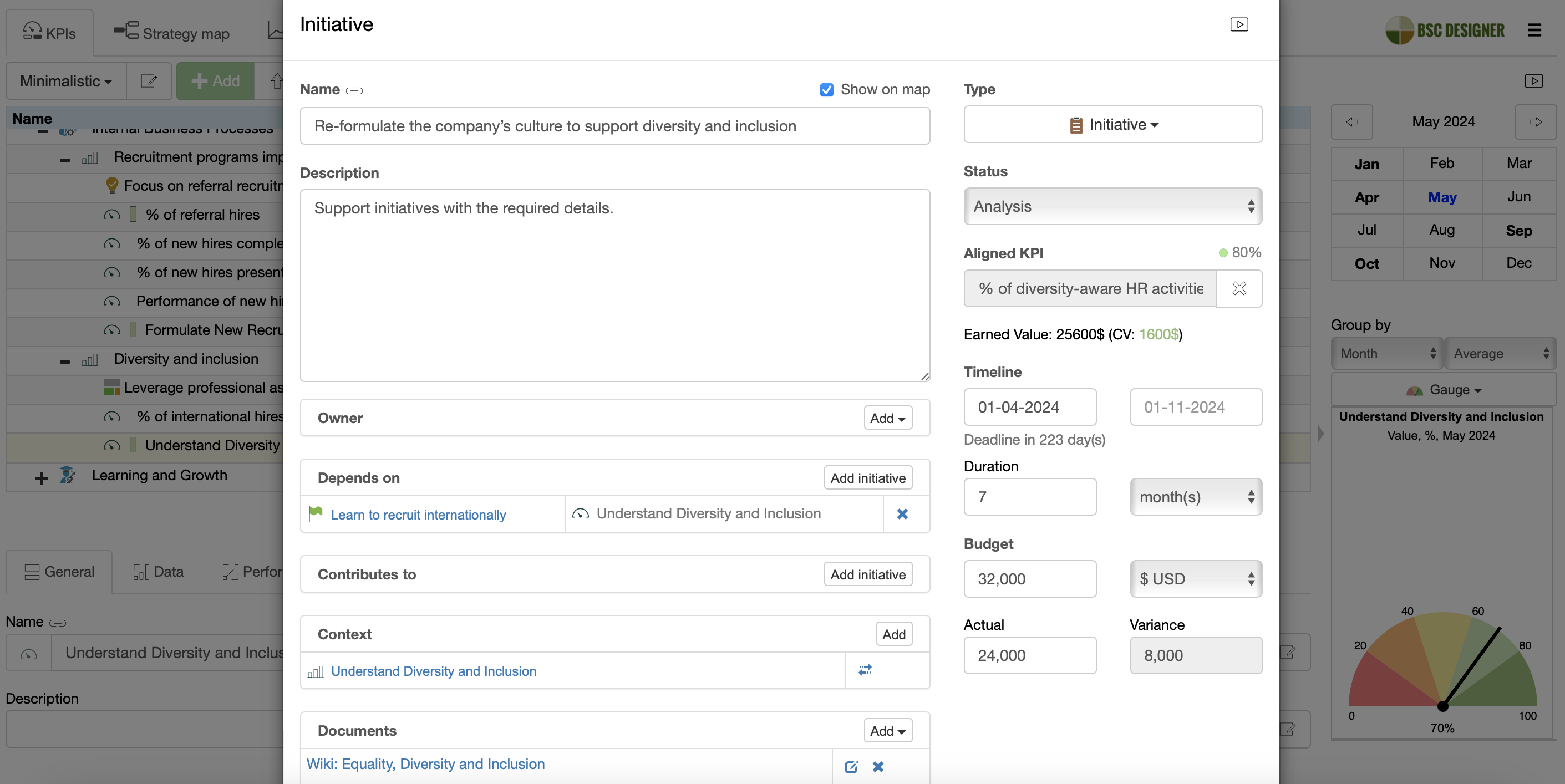
Use KPI Initiatives to associate files with indicators. Any type of file can be associated with indicators to provide you links to additional information such as: task assignments, charts, detailed instructions and authorization data (long text files), multimedia files (images, sounds, videos) and many more.
The attachments are not used in performance calculations, but are aimed to put together links for all of the additional information that relate to the task associated with the KPI in subject.
BSC DesignerProfessional Edition Functions
Professional functions are only available in the BSC Designer Pro edition. They include additional types of reports and charts, more options for you to customize functions based on your specific needs, unique features that link indicators and categories between different projects, database linking to projects using SQL, transferring data, and many other functions to meet almost any demand that your business might need for Balanced Scorecard.
BSC Designer Report for selected item
The report for selected item makes it easier to work with HTML reports. By using this feature, you can select any item, such as a subcategory or indicator, and create an HTML report that provides a single description, without mentioning the rest of the items in the project.
This function is extremely helpful and easy to use . It can be applied in many cases, including reporting to an upper manager/investor/ shareholder about the exact task or group of tasks, as well as how it’s been changed during the last year (for example, financial growth).
- Find more about reporting for selected item.
BSC Designer Overview Report
The overview report provides a clear overall picture of the map of operational goals. It does not show any values; simply the names of the categories and indicators, and their descriptions that are put together in an easy to understand colored diagram.

- Read more about Overview report.
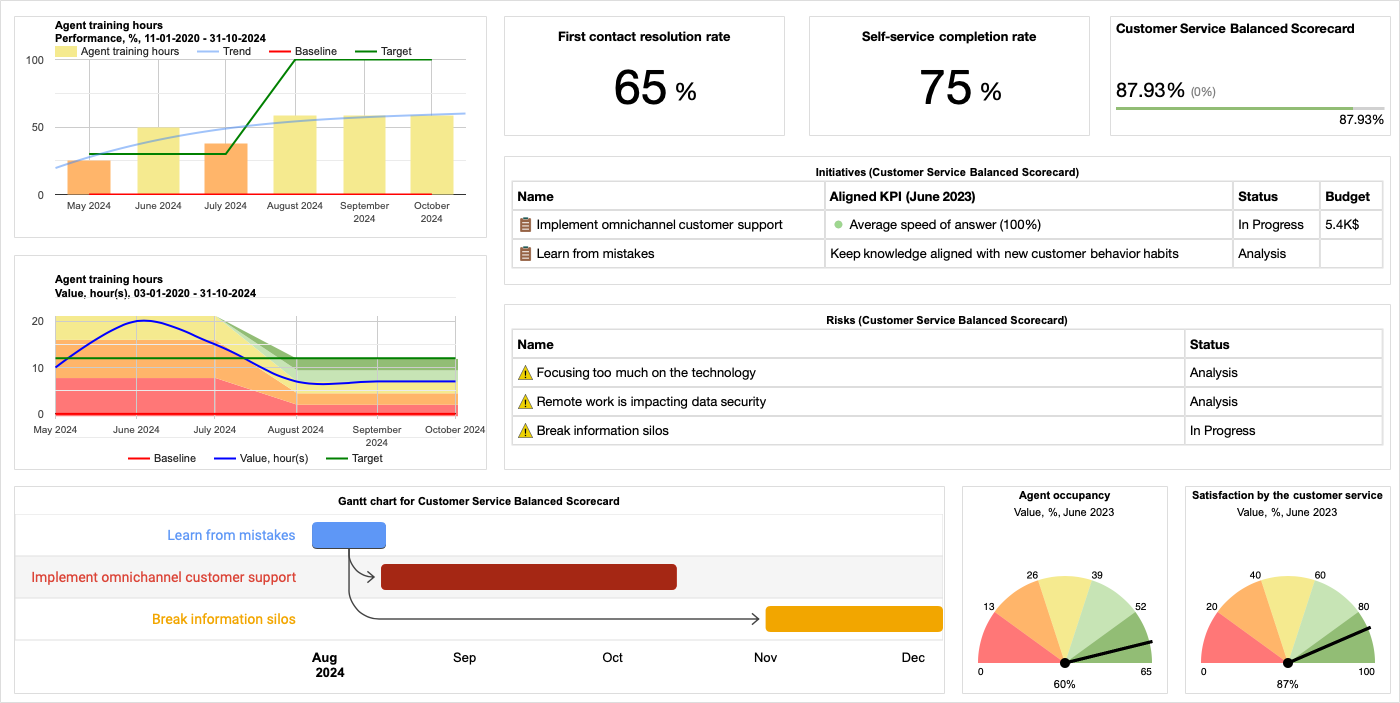
BSC Designer Dashboard Report
The dashboard report can be an alternative to the common HTML report, presenting information for a certain date from the calendar. You can choose what type of report is needed in different situations and for different purposes.

While common HTML reports aim to present the performance’s dynamics that might be interesting for shareholders, the dashboard report refers to the current project performance values, which may be better suited for an upper executive manager.
- Read more about Dashboard report.
Customize the HTML report
BSC Designer offers the option to customize the HTML report, and accommodate it to your specific needs. You can select the types of diagrams and charts to be shown, and the order of presenting them. This can all be done with just a few clicks!

Now you can make the HTML report look just like a Dashboard. You can choose the diagrams and charts from alll six types that exist in BSC Designer.
- Learn how to customize the HTML Report with BSC Designer PRO.
BSC Designer Gauge Diagram
The gauge diagram is another visualization method of performance. With this diagram, it is easier to measure actual performance against planned performance, and asses current level of business progress.
It also has colors that are used to clearly reveal the actual performance as “bad”, “middle” or “good” (the boarders of the colors can be set by the user).
- Read more about Gauge diagram.
BSC Designer Pie Performance Chart
The pie performance chart is an easy to understand circle graph, that shows the performance percentage for the whole project, as well as for all of the subcategories.
This chart illustrates business strengths and weaknesses, identifying which component makes a business project stronger or weaker.
- Learn more about Pie performance chart.
BSC Designer File Security
Ensure to secure your data with passwords function of BSC Designer. Different types of passwords can be set to protect pertinent data from being viewed or edited. Since BSC Designer deals with strategic and vulnerable information, this function can be very helpful in securing it.
- Learn more about protecting project with password in BSC Designer.
BSC Designer Weight Chart
The weight chart identifies the exact weight for every project element, as a total of the entire project. It can be easily understood that the “Financial perspective” category has a weight value of 40% for the whole project.
However, sometimes it’s hard to calculate the exact meaning of the indicator that is part of the subcategory, which in turn is a part of another subcategory, the Financial Perspective and the whole project.
By using the performance chart, this problem can be solved; you will see the weight of each element (subcategory or indicator) in regards to the whole project.
- Learn more about Weight chart.
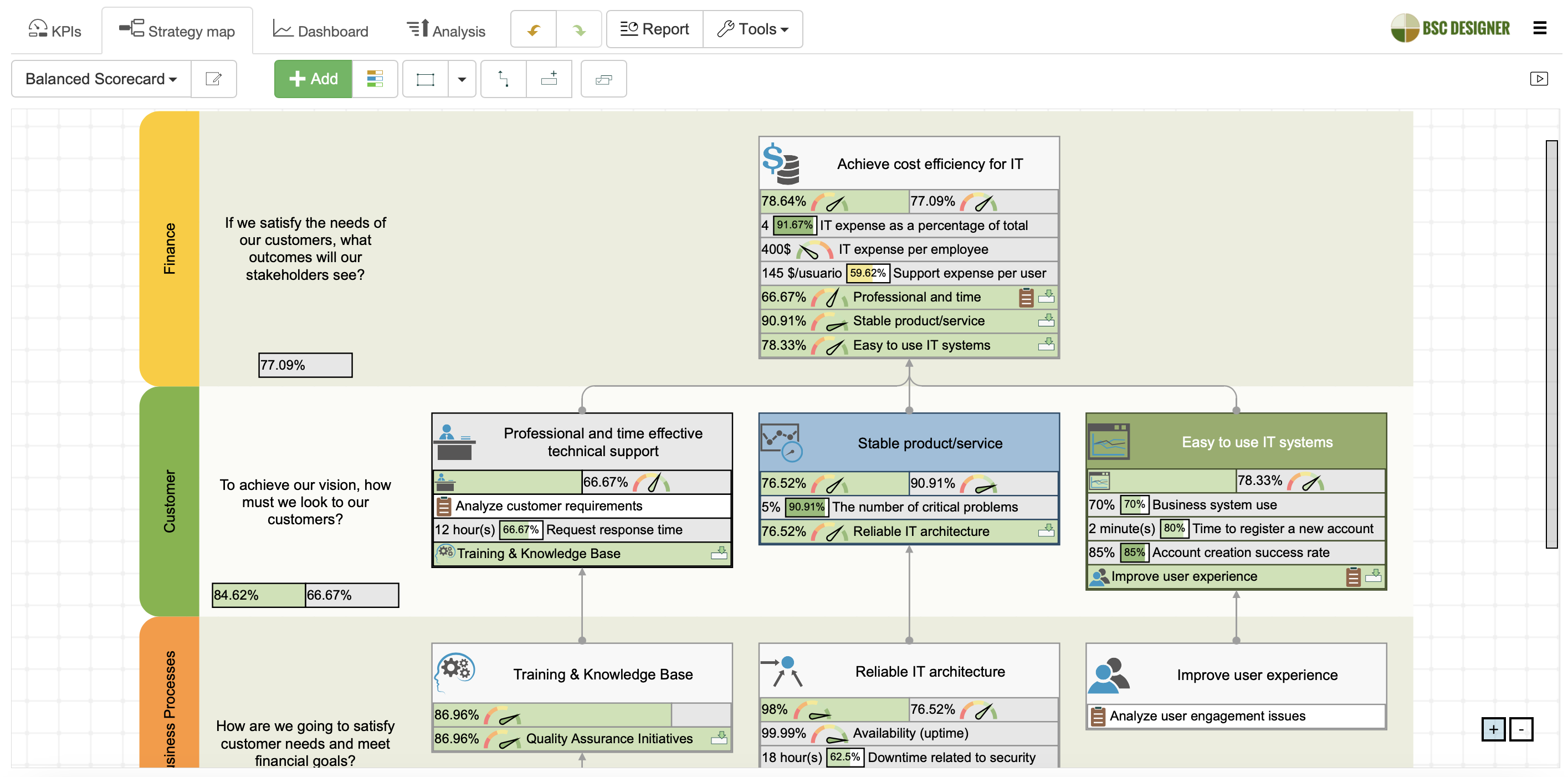
BSC Designer Strategy Map
The strategy map tab, combined with the operational dashboard, makes it easy to create and edit the Strategy Map (while reviewing the strategy). The strategy map is an extremely important component of the Balanced Scorecard concept, as it links all elements of the business goals and KPIs together.

In other words, you can use BSC Designer PRO not only as a dashboard for operational tasks, but also as a full Scorecard, which also includes strategy planning tools, such as the Strategy Map.
- Read more about the Strategy map.
BSC Designer Formula Builder
In the Pro edition, mathematical formulas for measuring performance values are not limited to the basic linear functions (as it is in Standard). The formulas can be customized to fit your needs in regards to finding out how to measure each of the KPIs.
An easy-to-use Formula Builder makes it possible for specialists (i.e. financial managers) to set formulas for each indicator or to use the standard ones.
- Read more about Formula Builder.
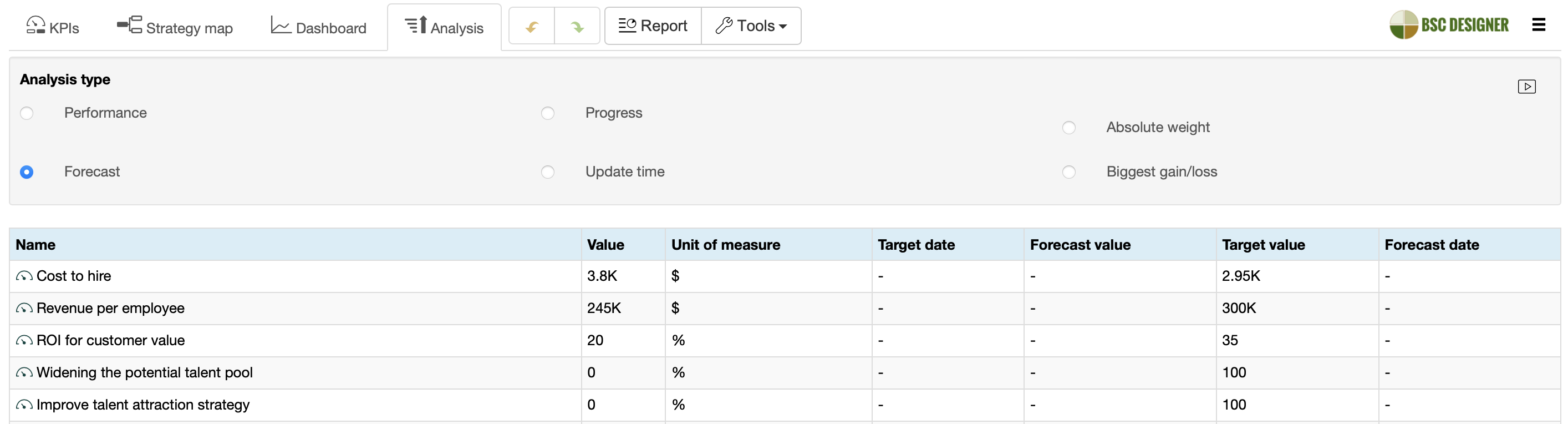
BSC Designer Analysis and Forecasting
BSC Designer doesn’t just record the values of your indicators; it can help you to evaluate them. This is what makes it such a powerful tool for business success, providing current knowledge and understanding of business practices and performance.
Use our new analysis tools to:
- Quickly identify your best- (and worst-) performing indicators
- Easily see which indicators are most important to your whole scorecard, and business overall
- Predict an indicator’s future value, based on its past performance
- Set up automatic alerts to let you know when the indicator’s value reaches a particular range
Read more about analysis and forecasting.
BSC Designer Delegate Indicators
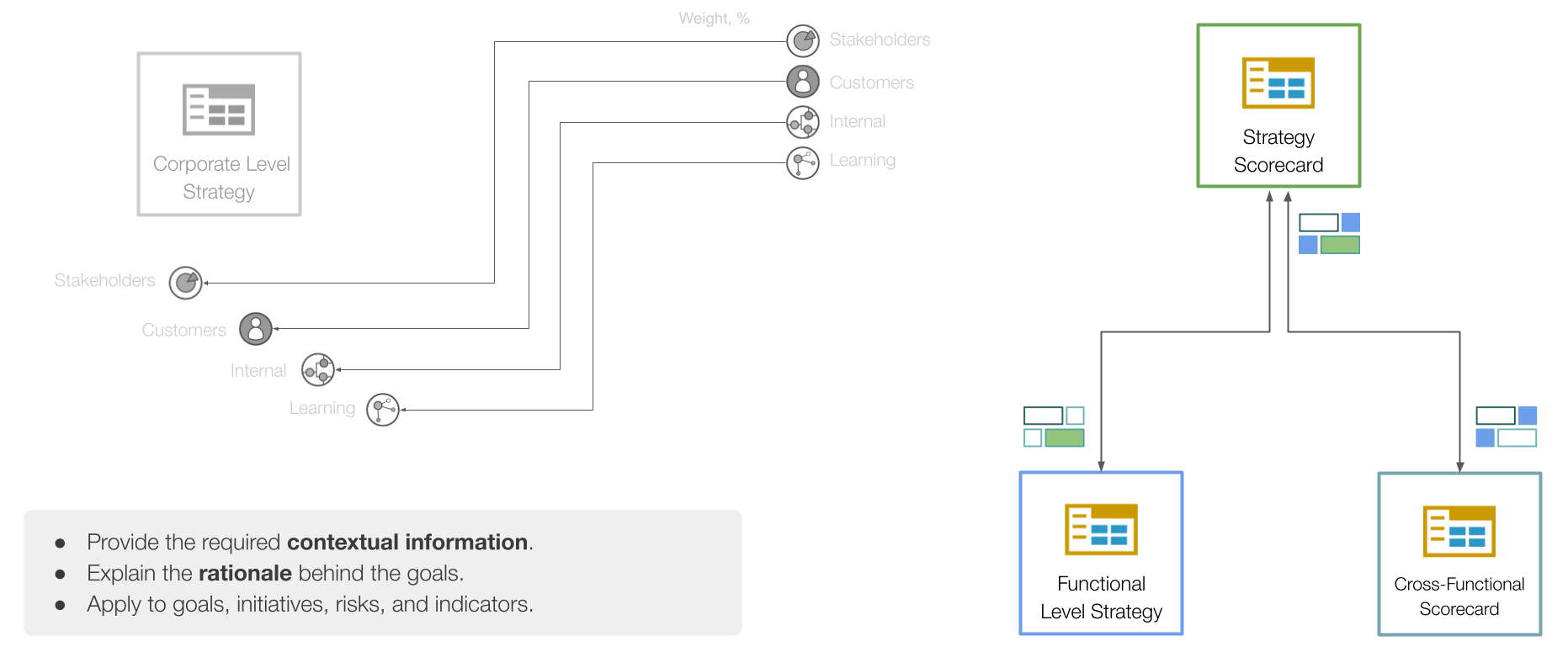
The BSC Designer gives you the ability to delegate and import indicators which will allow you to easily organize the Cascading Scorecards.
Since the tool is installed on every computer that is involved in the chain, the process of building the links between BSC projects is simple and time effective.
When the cascading is used, a CEO can see up-to-date information about their VP’s actual performance. The VPs could also give tasks and monitor for the lower level of management hierarchy, and so on.
- Check out the example of building cascading scorecards.
BSC Designer SQL Indicators

You can establish linking between the BSC project and almost any type of existing database using SQL Indicators. This tool becomes very useful when you need to connect to ERP’s or other databases that support the whole company’s processes or just a few activities (i.e. accounting).
With the easy-to-use SQL query builder, even non-IT professionals can handle it (if the database is not in suitable format, please contact our support service to learn more).
This function is also available in BSC Designer Online edition.
- Read more about how to set up SQL indicators
Our clients are very satisfied with how user-friendly and adaptable BSC Designer is, making it easy to fit any business model.
The possibility to manipulate values and to see the results immediately makes BSC Designer an especially “creative” tool. The software has an excellent functionality for developing strategies, modelling the underlying processes, and checking out the consequences of changes under specific conditions.
Dr. Udo Mattusch, Senior Developer at umanet.de. More case studies…
Download BSC Designer
Improve your business performance today, by making BSC Designer one of your strongest assets. This powerful and user-friendly tool will bring you knowledge and control over your business processes, help you successfully achieve your strategic goals, and give you competitive advantage in your industry.
BSC Designer is available as: